iframe
웹 어플리케이션 적용 : 에디터...
보안 문제 때문에 거부될 수도 있음
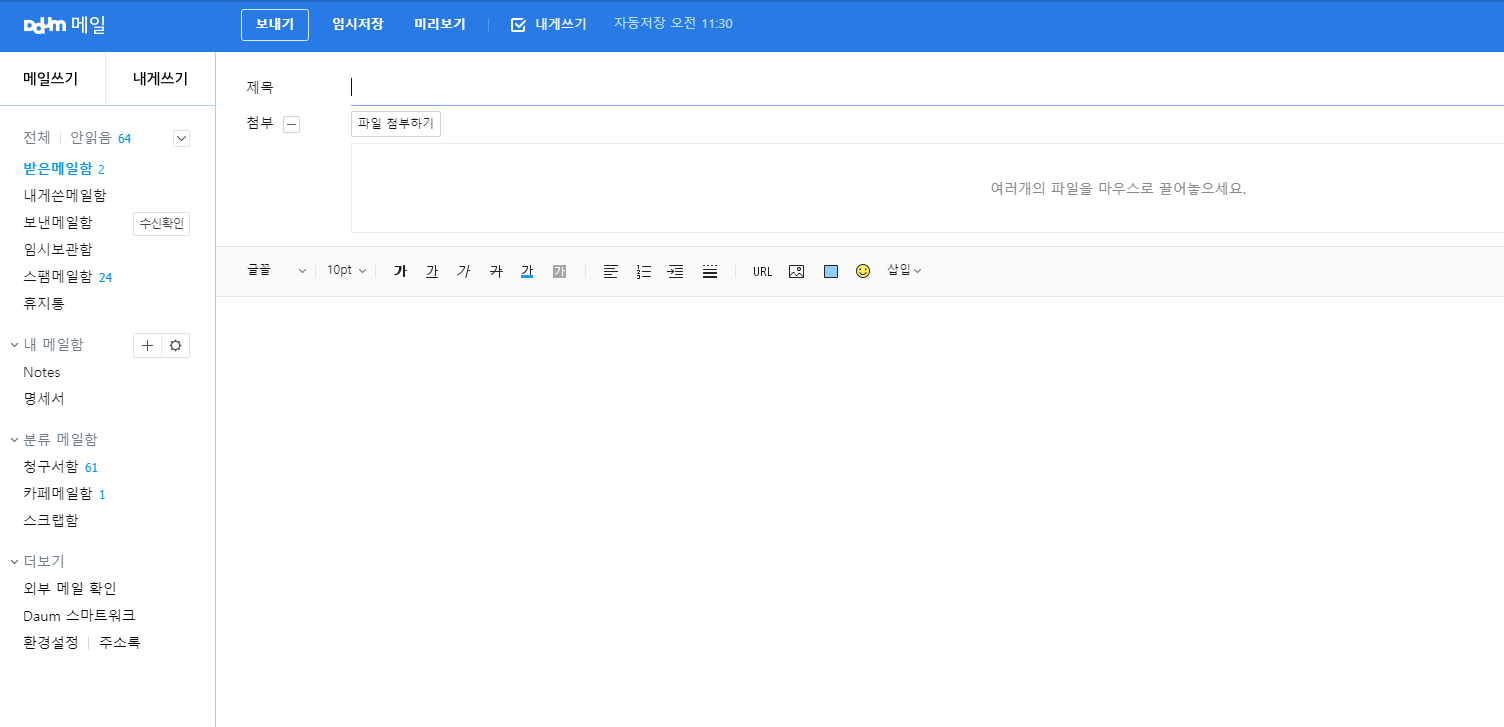
드라이버에서는 내부의 iframe을 찾을수 없음
포커스를 이동시켜야 함
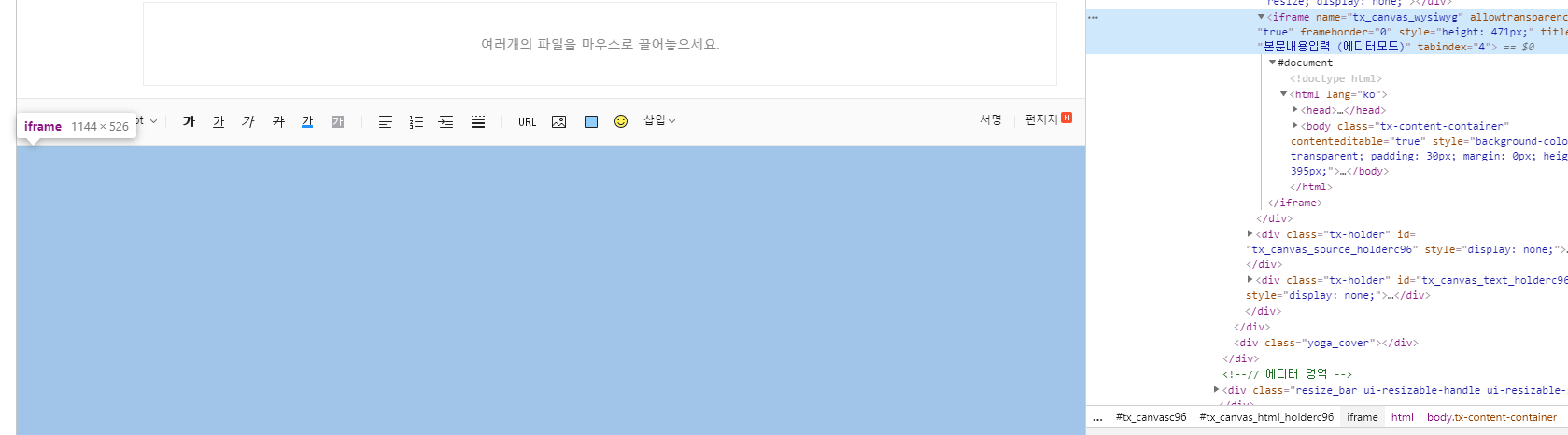
switchTo()
import java.util.List;

import org.openqa.selenium.By;
import org.openqa.selenium.JavascriptExecutor;
import org.openqa.selenium.WebDriver;
import org.openqa.selenium.WebElement;
import org.openqa.selenium.chrome.ChromeDriver;
import org.openqa.selenium.support.ui.ExpectedConditions;
import org.openqa.selenium.support.ui.WebDriverWait;

public class quiz01 {
	public static void main(String[] args)  throws Exception {
		System.setProperty("webdriver.chrome.driver", "chromedriver.exe");
		WebDriver driver = new ChromeDriver();
		WebDriverWait wait = new WebDriverWait(driver,10);
		JavascriptExecutor js = (JavascriptExecutor)driver;

		driver.get("https://logins.daum.net/accounts/signinform.do?url=https%3A%2F%2Fwww.daum.net%2F");
		driver.findElement(By.id("id")).sendKeys(Account.id);
		driver.findElement(By.id("inputPwd")).sendKeys(Account.pw);
		driver.findElement(By.id("loginBtn")).click();
		wait.until(ExpectedConditions.urlToBe("https://www.daum.net/"));
		driver.get("https://mail.daum.net/");

		//내가 한 방법 : 메일 이름들이 로딩 될때 까지 대기 , 더 느린듯
		//wait.until(ExpectedConditions.presenceOfElementLocated(By.className("tit_subject")));

		// globalIndicator - 한번 사라짐
		wait.until(ExpectedConditions.invisibilityOfElementLocated(By.id("globalIndicator")));
		//globalIndicator를 활용한 다른 코드
		//wait.until(ExpectedConditions.attributeToBe(By.id("globalIndicator"), "display", "none"));
		List<WebElement> btns = driver.findElements(By.className("btn_my"));
		btns.get(0).click();


		wait.until(ExpectedConditions.presenceOfElementLocated(By.id("mailSubject"))).sendKeys("제목~~~~~~~~~~!!!");

		driver.switchTo().frame("tx_canvas_wysiwyg"); // 포커스를 아이프레임으로

		driver.findElement(By.tagName("body")).sendKeys("내~~~~~~~~용~~~~~~~~~~~");


		Thread.sleep(5000);
		driver.close();
	}
}
보내기 버튼은 외부프레임
import java.util.List;

import org.openqa.selenium.By;
import org.openqa.selenium.JavascriptExecutor;
import org.openqa.selenium.WebDriver;
import org.openqa.selenium.WebElement;
import org.openqa.selenium.chrome.ChromeDriver;
import org.openqa.selenium.support.ui.ExpectedConditions;
import org.openqa.selenium.support.ui.WebDriverWait;

public class quiz01 {
	public static void main(String[] args)  throws Exception {
		System.setProperty("webdriver.chrome.driver", "chromedriver.exe");
		WebDriver driver = new ChromeDriver();
		WebDriverWait wait = new WebDriverWait(driver,10);
		JavascriptExecutor js = (JavascriptExecutor)driver;

		driver.get("https://logins.daum.net/accounts/signinform.do?url=https%3A%2F%2Fwww.daum.net%2F");
		driver.findElement(By.id("id")).sendKeys(Account.id);
		driver.findElement(By.id("inputPwd")).sendKeys(Account.pw);
		driver.findElement(By.id("loginBtn")).click();
		wait.until(ExpectedConditions.urlToBe("https://www.daum.net/"));
		driver.get("https://mail.daum.net/");

		//내가 한 방법 : 메일 이름들이 로딩 될때 까지 대기 , 더 느린듯
		//wait.until(ExpectedConditions.presenceOfElementLocated(By.className("tit_subject")));

		// globalIndicator - 한번 사라짐
		wait.until(ExpectedConditions.invisibilityOfElementLocated(By.id("globalIndicator")));
		//globalIndicator를 활용한 다른 코드
		//wait.until(ExpectedConditions.attributeToBe(By.id("globalIndicator"), "display", "none"));
		List<WebElement> btns = driver.findElements(By.className("btn_my"));
		btns.get(0).click();


		wait.until(ExpectedConditions.presenceOfElementLocated(By.id("mailSubject"))).sendKeys("제목~~~~~~~~~~!!!");

		driver.switchTo().frame("tx_canvas_wysiwyg"); // 포커스를 아이프레임으로
		driver.findElement(By.tagName("body")).sendKeys("내~~~~~~~~용~~~~~~~~~~~");

		driver.switchTo().defaultContent(); // 포커스를 기본값으로
		List<WebElement> btnWrite= driver.findElements(By.cssSelector(".wrap_toolbar .btn_write"));
		btnWrite.get(0).click();

		Thread.sleep(5000);
		driver.close();
	}
}'디지털 컨버전스 > Selenium' 카테고리의 다른 글
| [Selenium] 팝업창 제어 (0) | 2020.04.22 |
|---|---|
| [Selenium] 이미지 로딩 제거 (0) | 2020.04.22 |
| [Selenium] 자바스크립트 입력 - 로그인 (0) | 2020.04.22 |
| [Selenium] 명시적 대기 (0) | 2020.04.22 |
| [Selenium] id값을 모르는 경우 선택하기 (0) | 2020.04.21 |