개발자가 set~, get~로 매서드이름을 만든다는 전제하에 강력한 프레임워크가 제공됨
대부분에 만드는게 이득
문법적으로 에러가 생기진 않지만 글로벌 관습
//예제1 TV
public class TV {

	private int channel;
	private int volume;

	public int getChannel() {
		return channel;
	}
	public void setChannel(int channel) {
		this.channel = channel;
	}
	public int getVolume() {
		return volume;
	}
	public void setVolume(int volume) {
		this.volume = volume;
	}
//setters, getters 생성 단축키
//Alt + Shift + S // + R // alt+A +R
//heap 메모리는 깨끗, 초기값으로 쓰레기값을 가지지 않고 초기값 0값을 갖는다.
}
//예제1 Main
public class Main {

	public static void main(String[] args) {

			TV tv = new TV();

			System.out.println(tv.getChannel()); // 0

	}
}
//초기값 채널5 볼륨10으로 설정 하기 (1)클래스 설계자가 넣는 디폴트벨류
//값이 할당되는 속도는 가장 빠르다.
//나중에 사용자가 setter로 값을 넣으면 덮어써짐
public class TV {

	private int channel =5; //new 명령어 사용전, 아직 공간 없음
	private int volume=10; //아직 공간은 없지만 나중에 값을 넣겠다.(설계도)

	public int getChannel() {
		return channel;
	}
	public void setChannel(int channel) {
		this.channel = channel;
	}
	public int getVolume() {
		return volume;
	}
	public void setVolume(int volume) {
		this.volume = volume;
	}
}
public class TV {
private int channel =3;
private int volume=2;
public int getChannel() {
return channel;
}
public void setChannel(int channel) {
this.channel = channel;
}
public int getVolume() {
return volume;
}
public void setVolume(int volume) {
this.volume = volume;
}
}//초기값 채널5 볼륨10으로 설정 하기 (2)사용자가 넣는 디폴트벨류
public class Main {
public static void main(String[] args) {
TV tv = new TV();
tv.setChannel(5);
tv.setVolume(10);
System.out.println(tv.getChannel()); //5
System.out.println(tv.getVolume()); //10
}
}
//초기값 채널5 볼륨10으로 설정 하기 (3) 가장 많이 쓰는 방법 Constructor : 생성자 메서드

public class TV {

	private int channel =3;
	private int volume=50;
	//생성자는 인스턴스 생성시 사용할 초기값을 넣어줌
	public TV(int channel, int volume){ //접근제한자는 마음대로
		System.out.println("TV 생성자 메서드 입니다.");
		this.channel = channel;
		this.volume = volume;
	}
	// Constructor : 생성자 메서드 (특이하다)
	// 생성자 메서드의 이름은 클래스의 이름과 동일해야 한다.
	// 생성자 메서드는 Return값을 가지지 않는다.
	// 생성자는 호출시기를 사용자 마음대로 지정할 수 없다.
	//  > 생성자 메서드 호출시기는 인스턴스 생성시기이다.
	// 그 외의 모든 규칙을 일반 메서드와 동일하다.
	// (매개변수, 오버로딩 등...)

	//암묵적 문법 (this , import.java.lang.*) 중 하나


	public int getChannel() {
		return channel;
	}
	public void setChannel(int channel) {
		this.channel = channel;
	}
	public int getVolume() {
		return volume;
	}
	public void setVolume(int volume) {
		this.volume = volume;
	}
}
//생성자 메서드
public class Main {
	public static void main(String[] args) {
			TV tv = new TV(5,10); // 인스턴스가 생성 될 때 자동으로 call
			//매서드나 제어문에 소괄호가 붙음, 생성자 매서드
//			tv. //tv생성자는 콜 할수 없다(. 눌러도 안보임)

			System.out.println(tv.getChannel());
			System.out.println(tv.getVolume());

	}
}
//클래스에 개발자가 넣는 초기값 > 생성자 > 사용자가 넣는 초기값
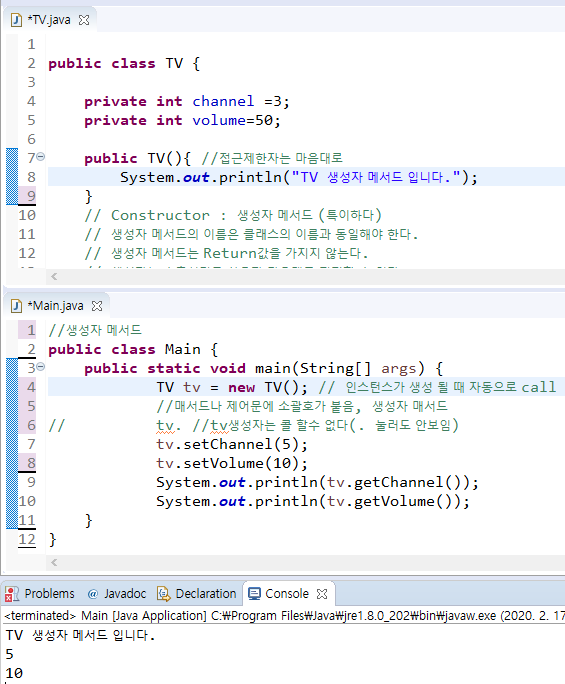
//생성자 메서드
//매개변수가 있는 생성자는 명시하는 순간
//매개변수가 없는 기존의 생성자는 지워짐

public class Main {
	public static void main(String[] args) {
			TV tv = new TV(5,10);
			TV tv1 = new TV(); // 에러 The constructor TV() is undefined

//1. 그냥 인자값을 넣어주기
//2. 오버로딩 , 인자값 없는 생성자 매서드도 만들어 놓기

			System.out.println(tv.getChannel());
			System.out.println(tv.getVolume());
	}
}
public class TV {

	private int channel =3;
	private int volume=50;

	public TV(int channel, int volume){ // 매개변수 있는 생성자메서드
		System.out.println("TV 생성자 메서드 입니다.");
		this.channel = channel;
		this.volume = volume;
	}
	public TV(){}                      // 매개변수 없는 생성자메서드


	public int getChannel() {
		return channel;
	}
	public void setChannel(int channel) {
		this.channel = channel;
	}
	public int getVolume() {
		return volume;
	}
	public void setVolume(int volume) {
		this.volume = volume;
	}
}
예제 Person
//예제2 Person // setter getter constructor 정보은닉
public class Person {

	private String id;
	private String name;
	private int age;

	public Person() {}
	public Person(String id, String name, int age) {
		this.id = id;
		this.name = name;
		this.age =age;
	}

	public String getId() {
		return id;
	}
	public void setId() {
		this.id = id;
	}
	public String getName() {
		return name;
	}
	public void setName() {
		this.name = name;
	}
	public int getAge() {
		return age;
	}
	public void setAge() {
		this.age = age;
	}

}
public class Main {
	public static void main(String[] args) {

		Person p1 = new Person("100", "Tom", 20);
		Person p2 = new Person("300", "철수", 30);

		System.out.println(p1.getId());
		System.out.println(p1.getName());
		System.out.println(p1.getAge());
	}
}
멤버 필드
//멤버필드
public class Temp {

	public int a;
	//instance member field
	//main이 시작되고 new 라인부터 생성

	public static int b;
	//class member field //정적인 고정된 // 클래스단계에서 멤버가 됨
	//프로그램main 이 시작되자마자 data memory에 고정
	//main이 시작됨과 동시에 고정

}
public class Main {
	public static void main(String[] args) {

		//a는 없고 b는 존재 (인스턴스와 무관, 클래스 수준에서 사용 가능)
		Temp.b = 20;

//		Temp t = new Temp();
//		t.a = 10;
//		t.b = 20; // 멤버필드처럼 사용 가능

//		Integer.parseInt //class 단계에서 .을 찍는 것은 static 요소들을 보겠다는것
		Math.random(); //random에 static키워드가 있다

	}
}
public class Main {
public static void main(String[] args) {
Temp t1 = new Temp();
Temp t2 = new Temp();
Temp t3 = new Temp();
// 인스턴스에 [a][a][a] 생성 // a변수는 각자
// b는 공유되는 변수, 주소값만 가짐
Temp.b = 50;
System.out.println(t1.b); // 50
System.out.println(t2.b); // 50
t1.b = 30; // t1를 통해 b에 30 넣음
System.out.println(t1.b); // 30
System.out.println(t2.b); // 30 //t2를 통해 접근해도 30으로 변경된 값 확인
// a를 어디서나 접근할수 있나? O : public
// a를 언제나 접근할수 있나? X : 생성이후
// b는 언제 어디서나 접근 가능 public static : (다른언어의 표현)전지역변수, 전역변수 처럼 쓰인다.
}
}- public static : 편하기는 하지만 안좋은 점도 있음
- 지역변수
- 메서드가 실행될때 생성되서 끝날때 반환, 유동성, 메모리 효율성 좋음
- 멤버필드
- 인스턴스 생성시 (new) , 인스턴스의 모든레퍼런스가 사라지면 사라짐, 인스턴스와 생성주기를 함께함
- 정적변수
- main 시작하자마자 만들어짐, 프로그램이 끝날 때까지 반환되지 않음, 메모리 유동성 매우 낮음
- 프로그램이 무겁다.
- 프로그램 전체에서 단 한번도 사라지지 않고 유지하면서 계속 사용하는 것
- ex. 레벨 (cpu로 처리 > ram저장 > 변수) (cf. 몬스터는 지역변수로)
Quiz_01
//Quiz_01
public class Product {
	private String id;
	private String name;
	private int price;

	public Product() {}

	public Product(String id,String name, int price) {
		this.id = id;
		this.name = name;
		this.price = price;
	}

	public String getId() {
		return id;
	}
	public void setId() {
		this.id = id;
	}
	public String getName() {
		return name;
	}
	public void setName() {
		this.name = name;
	}
	public int getPrice() {
		return price;
	}
	public void setPrice() {
		this.price = price;
	}

}
public class Quiz_01 {

	public static void print(Product p) {
		//인자값으로 Product 인스턴스를 받으면,
		//해당 인스턴스의 모든 내용을 출력하는 메서드
			System.out.println(p.getId()
					+" : "+p.getName()
					+" : "+p.getPrice());

	}

	public static void main(String[] args) {
		// 1001번 상품 - 볼펜 - 2000
		// 1002번 상품 - 가위 - 3000

		Product ballPen = new Product("1001","볼펜",2000);
		Product scissors = new Product("1002","가위",3000);

		Product[] pds = new Product[2]; //배열로 만드는 것도 가능
		pds[0] = ballPen;
		pds[1] = scissors;

		//가위의 가격을 출력
		System.out.println(pds[1].getPrice());

		//모든 Product의 모든 내용을 출력해보세요 (반복문으로 하세요.)
//		for(int i =0; i< pds.length ; i++) {
//			System.out.println(pds[i].getId()
//					+" : "+pds[i].getName()
//					+" : "+pds[i].getPrice());
//		}
		Quiz_01.print(ballPen);

	}

}
~기초문법//
+다형성 선형화
라이브러리 활용
FTP(File Transfer Protocol)
FTP 서버 & 클라이언트
192.168.60.32 조장ip
java
1234
http://www.sauronsoftware.it/projects/ftp4j/

import java.io.File;

import it.sauronsoftware.ftp4j.FTPClient;
//알FTP로 서버 생성 + http://www.sauronsoftware.it/projects/ftp4j/manual.php#4
public class Main {

	public static void main(String[] args) {//main에서는 드로우 하지 말것, try-catch 사용

		FTPClient client = new FTPClient();

		try {
		client.connect("192.168.60.32");
		}catch(Exception e) {
			e.printStackTrace();
		}

		try {
		client.login("java", "1234");
		}catch(Exception e) {
			e.printStackTrace();
		}

		try {
		client.download("다운로드하세요1.txt", new File("다운성공.txt"));//경로 안쓰면 프로젝트 폴더에 저장
		//참조자료형 > 인스턴스 생성하고 주소값 입력해야
		//파일 인코딩 ANSI로 저장
		}catch(Exception e) {
			e.printStackTrace();
		}
		try {
		client.disconnect(true);
		}catch(Exception e) {
			e.printStackTrace();
		}
	}

}
import java.io.File;
import java.util.Scanner;

import it.sauronsoftware.ftp4j.FTPClient;
import it.sauronsoftware.ftp4j.FTPFile;

public class Main {

	public static void main(String[] args) {//main에서는 드로우 하지 말것
		Scanner sc = new Scanner(System.in);
		FTPClient client = new FTPClient();
		while(true) {
			System.out.println("===FTP Client Program===");
			System.out.println("1. Connect FTP Server");
			System.out.println("2. Exit Program");
			System.out.print(">>>");
			String input = sc.nextLine();

			try {

				if(input.contentEquals("1")) {

					System.out.println("input url");
					System.out.print(">>>");
					String url = sc.nextLine();
					client.connect(url);

					System.out.println("input port");
					System.out.print(">>>");
					String port = sc.nextLine();

					System.out.println("try to connect : "+url+"(port : "+port+")");


					System.out.println("input id");
					System.out.print(">>>");
					String id = sc.nextLine();

					System.out.println("input password");
					System.out.print(">>>");
					String password = sc.nextLine();

					client.login(id, password);

					System.out.println("Login Success");

					while(true) {
						System.out.println("1. Upload File");
						System.out.println("2. Download File");
						System.out.println("3. Disconnect FTP Server");
						System.out.println("4. Delete File");
						System.out.print(">>>");
						String input2 = sc.nextLine();

						if(input2.contentEquals("1")) {
							try {
								System.out.println("input upload file name");
								System.out.print(">>>");
								String upload = sc.nextLine();

								client.upload(new java.io.File(upload));
							}catch(Exception e) {
								e.printStackTrace();

							}
							continue;

						}else if(input2.contentEquals("2")) {
							try {
								FTPFile[] list = client.list();
								for(int i=0;i< list.length; i++) {
									System.out.println("파일명 : "+list[i].getName()+"	사이즈 : "+list[i].getSize());//파일리스트 출력
								}


								System.out.println("input remoteFileName");//받을 파일 이름
								System.out.print(">>>");
								String remoteFileName = sc.nextLine();

								System.out.println("input localFile");// 저장할 이름
								System.out.print(">>>");
								String localFile = sc.nextLine();

								client.download(remoteFileName, new File(localFile));//경로 안쓰면 프로젝트 폴더에 저장
								//참조자료형 > 인스턴스 생성하고 주소값 입력해야
								//파일 인코딩 ANSI로 저장, 내용이 있어야 전송
								System.out.println("Success! F5를 눌러 확인하세요.");
							}catch(Exception e) {
								e.printStackTrace();

							}
							continue;

						}else if(input2.contentEquals("3")) {

							client.disconnect(true);
							System.out.println("Disconnect FTP Server");

							continue;

						}else if(input2.contentEquals("4")) {

							try {
								FTPFile[] list = client.list();
								for(int i=0;i< list.length; i++) {
									System.out.println("파일명 : "+list[i].getName()+"	사이즈 : "+list[i].getSize());//파일리스트 출력

								}

								System.out.println("input Delete FileName");
								System.out.print(">>>");
								String Delete = sc.nextLine();
								client.deleteFile(Delete);
								System.out.print("삭제완료");
							}catch(Exception e) {
								e.printStackTrace();

							}
							continue;

						}else {
							System.out.println("메뉴를 다시 확인해 주세요.");

						}

					}

				}else if (input.contentEquals("2")) {

					System.out.println("프로그램 종료");
					System.exit(0);

				}else {
					System.out.println("메뉴를 다시 확인해 주세요.");
				}

			}catch(Exception e) {
				e.printStackTrace();

			}

		}

	}

}'디지털 컨버전스 > JAVA' 카테고리의 다른 글
| [Java] 객체 지향 중급 문법, 상속, override (0) | 2020.02.19 |
|---|---|
| [Java] FTP (1) | 2020.02.18 |
| [Java] Method , OOP (객체 지향 프로그램) , 정보은닉 , 접근제한자 (0) | 2020.02.14 |
| [Java] Method (0) | 2020.02.13 |
| [Java] 배열 (0) | 2020.02.12 |