데이터가 div를 벗어날때
<!DOCTYPE html>
<html lang="en">
<head>
    <meta charset="UTF-8">
    <title>Document</title>
    <style>
        *{box-sizing: border-box;}
        div{border: 1px solid black;}
        .wrapper{width: 300px;height: 200px;margin: auto;}
        table{
            width: 100%;
            border:1px dotted red;

        }
        table tr{
            border: 1px solid red;
        }
    </style>
</head>
<body>
    <div class="wrapper">
        <table border="1">
            <tr>
                <td>Data~~~~~~~~~~~~~</td>
            </tr>
            <tr>
                <td>Data~~~~~~~~~~~~~</td>
            </tr>
            <tr>
                <td>Data~~~~~~~~~~~~~</td>
            </tr>
            <tr>
                <td>Data~~~~~~~~~~~~~</td>
            </tr>
            <tr>
                <td>Data~~~~~~~~~~~~~</td>
            </tr>
            <tr>
                <td>Data~~~~~~~~~~~~~</td>
            </tr>
            <tr>
                <td>Data~~~~~~~~~~~~~</td>
            </tr>
            <tr>
                <td>Data~~~~~~~~~~~~~</td>
            </tr>
            <tr>
                <td>Data~~~~~~~~~~~~~</td>
            </tr>
        </table>

    </div>
</body>
</html>
overflow: hidden
        .wrapper{
            width: 300px;
            height: 200px;
            margin: auto;
            overflow: hidden;
        }
overflow: hidden보다는 스크롤
        .wrapper{
            width: 300px;
            height: 200px;
            margin: auto;
            overflow: scroll;
        }
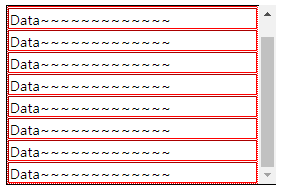
횡방향 스크롤 필요 없음 - overflow-y: scroll;
       .wrapper{
            width: 300px;
            height: 200px;
            margin: auto;
            overflow-y: scroll;
        }
내용이 적을때는 스크롤이 없다 많아지면 생기는 - overflow-y: auto;
        .wrapper{
            width: 300px;
            height: 200px;
            margin: auto;
            overflow-y: auto;
        }
'디지털 컨버전스 > HTML&CSS' 카테고리의 다른 글
| [CSS] Positioning - position: absolute (0) | 2020.04.07 |
|---|---|
| [CSS] Positioning - position: relative (0) | 2020.04.07 |
| [CSS] Layout (0) | 2020.04.06 |
| [CSS] Internal Style, External Style, 선택자 (0) | 2020.04.03 |
| [HTML] form (0) | 2020.04.03 |