-- 데이터베이스
-- DDL / DML / DCL / TCL
-- DQL
-- 기본 SELECT / Function
-- GroupBy / JOIN
GroupBy
select dept_code
from employee ;

select dept_code
from employee
group by dept_code ;
-- 부서코드별로 그룹지어서 출력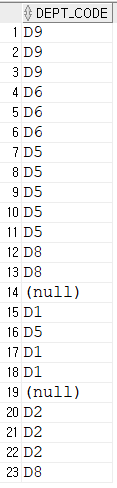
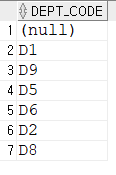
부서코드 별로 묶이면 다른 column은 어떨게 될까?
그룹화 시킨 대상만 출력 가능
select emp_name, dept_code
from employee
group by dept_code ;

--ORA-00979: not a GROUP BY expression
--00979. 00000 -  "not a GROUP BY expression"
그룹별 합계는 출력 가능 (그룹화된컬럼, 그룹함수)
select dept_code , sum(salary)
from employee
group by dept_code ;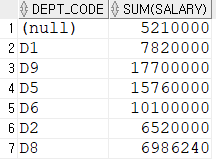
-- 직급별 급여 평균

select
    job_code "직급 코드" ,
    to_char(avg(salary),'L999,999,999') "급여 평균" ,
    count(*) "인원 수"
from employee
group by job_code
order by job_code;

-- order by는 group by 뒤에
-- count(*) 직급별 인원수
-- 부서 별 인원수
select
dept_code "부서 코드" ,
count(*) "인원 수"
from employee
group by dept_code
order by dept_code;-- 년생과 인원수
select
substr(emp_no,1,2) "년생" ,
count(*) "인원 수"
from employee
group by
substr(emp_no,1,2);-- 성별 인원수
select
case
when substr(emp_no,8,1) in ('2','4')
then '여'
when substr(emp_no,8,1) in ('1','3')
then '남'
end "성별" ,
count(*) "인원 수"
from employee
group by
case
when substr(emp_no,8,1) in ('2','4')
then '여'
when substr(emp_no,8,1) in ('1','3')
then '남'
end;select
decode(substr(emp_no,8,1),1,'남',2,'여',3,'남',4,'여') "성별",
count(*) "인원 수"
from employee
group by
decode(substr(emp_no,8,1),1,'남',2,'여',3,'남',4,'여');이중 그룹화
-- 부서별 직급코드 분류

select
    dept_code,
    job_code
from employee
    group by dept_code, job_code
    order by 1,2;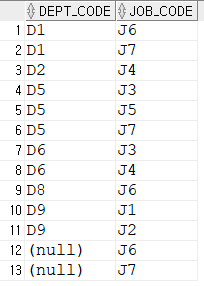
select
    dept_code,
    job_code,
    sum(salary)
from employee
    group by dept_code, job_code
    order by 1,2;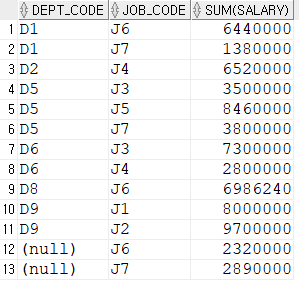
-- null 대신 부서없음으로 표시

select
    nvl(dept_code,'부서없음') "부서 내",
    job_code "직급 별",
    sum(salary) "급여 합계"
from employee
    group by dept_code, job_code
    order by 1,2;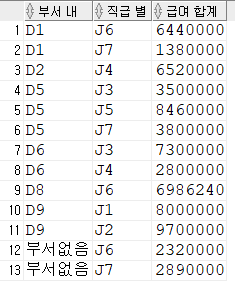
-- 컬럼명 뒤에 텍스트 붙일 수 있음

select
    nvl(dept_code,'부서없음')||'부서 내' "부서 내",
    job_code||'직급의' "직급 별",
    sum(salary) "급여 합계"
from employee
    group by dept_code, job_code
    order by 1,2;
그룹화 예제
-- 1. 직급별 총 급여 및 연봉을 출력하세요.

select
    job_code "직급",
    to_char(sum(salary),'L999,999,999') "급여 합계",
    to_char(sum(salary*12),'L999,999,999') "연봉합계"
from employee
group by job_code
order by 1;
-- 2. 부서코드, 급여합계, 급여평균, 인원수
select
nvl(dept_code,'부서없음') "부서코드",
to_char(sum(salary),'L999,999,999') "급여합계",
to_char(avg(salary),'L999,999,999') "급여평균",
count(*) "인원수"
from employee
group by dept_code
order by 1;-- 3. 부서별로 보너스를 지급받는 직원의 총합
select
nvl(dept_code,'부서없음') "부서코드",
count(*) "인원수"
from employee
where bonus is not null
group by dept_code
order by 1;-- 4. J1과 J2 직급을 제외한 나머지 직급의 인원 수 및 급여 평균
select
job_code "부서코드",
count(*) "인원수",
to_char(avg(salary),'L999,999,999') "급여 평균"
from employee
where job_code != 'J1' and job_code != 'J2'
group by job_code
order by 1;-- 5. 부서내 성별별 인원수
select
job_code "부서코드",
decode(substr(emp_no,8,1),1,'남',2,'여',3,'남',4,'여') "성별",
count(*) "인원수"
from employee
group by job_code, substr(emp_no,8,1)
order by 1, 2;-- 6. 나이대별 인원 수 및 급여 평균
select
decode(substr(emp_no,1,1),6,'60년대생',7,'70년대생',8,'80년대생') "나이 대",
count(*) "인원수",
to_char(avg(salary),'L999,999,999') "급여 평균"
from employee
group by substr(emp_no,1,1)
order by 1;-- 7. 성별 및 연령 대별 인원 수
select
decode(substr(emp_no,8,1),1,'남',2,'여',3,'남',4,'여') "성별",
decode(substr(emp_no,1,1),6,'60년대생',7,'70년대생',8,'80년대생') "연령 대",
count(*) "인원수"
from employee
group by substr(emp_no,8,1), substr(emp_no,1,1)
order by 2, 1;
having
그룹화된 데이터에 대한 조건을 명시할때 쓰는 문법
그룹함수 포함해서를 사용할때 사용하는 조건
그룹화된 데이터라도 그룹함수를 포함하지 않는다면 where절을 사용한다.
--where절에서는 그룹함수를 쓸 수 없다.

select
    nvl(dept_code, '인턴') "부서코드",
    floor(avg(salary)) "급여평균"
from employee
    where floor(avg(salary)) > 3000000
    group by dept_code
    order by 1;

--00934. 00000 -  "group function is not allowed here"
-- 그룹함수는 where절에 허용 되지 않는다.
--having : 그룹화된 데이터에 대한 조건을 명시할때 쓰는 문법
select
nvl(dept_code, '인턴') "부서코드",
floor(avg(salary)) "급여평균"
from employee
group by dept_code
having floor(avg(salary)) >= 3000000
order by 1;rollup
집계함수, 더 많은 내용들을 출력 할때 사용된다.
데이터베이스 내에서 내용을 확인하는 용도로 주로 쓰임
group by를 보조하는 기능
select
    nvl(dept_code, '인턴') "부서",
    sum(salary) "부서별 합계"
from employee
    group by rollup(nvl(dept_code, '인턴'))
    order by 1;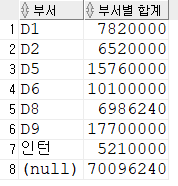
--rollup의 인자값이 1개 이상이어도 된다.

select
    dept_code,
    job_code,
    sum(salary)
from employee
    group by rollup(dept_code, job_code)
    order by 1,2;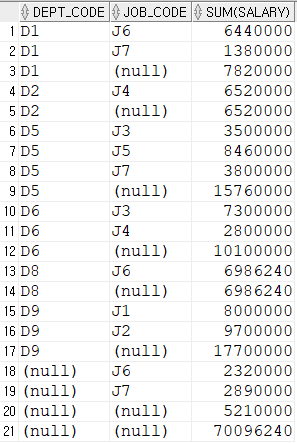
-- 집계함수로 인해 추가된 (null)값 처리 : 실패

select
    nvl(dept_code,'부서없음') "부서코드",
    nvl(job_code,'직급별총계') "직급코드" ,
    sum(salary) "계"
from employee
    group by rollup(nvl(dept_code,'부서없음'), nvl(job_code,'직급별총계'))
    order by 1,2;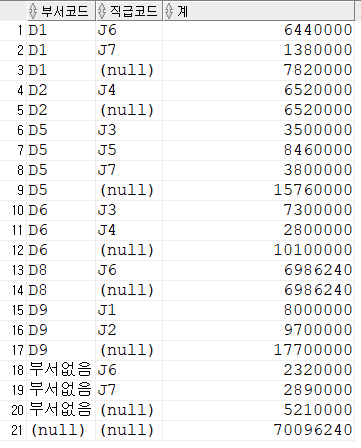
grouping
null값을 조사하는 함수
원래 존재하던 null은 0을 반환
집계 함수를 통해 발생한 null은 1을 반환
--grouping

select
    dept_code,
    grouping(dept_code),
    job_code,
    grouping(job_code),
    sum(salary) "계"
from employee
    group by rollup(dept_code,job_code)
    order by 1,3;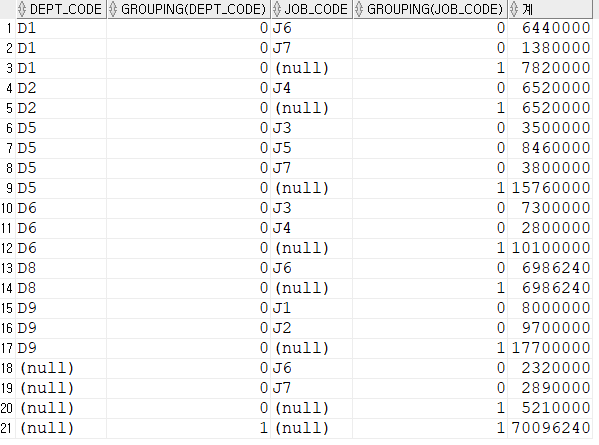
-- 집계함수로 인해 추가된 (null)값 처리 : grouping

select
    decode(grouping(dept_code),0,dept_code,1,'총계') "부서코드",
    decode(grouping(job_code),0,nvl(dept_code,'인턴'),1,'부서별 총계') "직급코드",
    sum(salary) "계"
from employee
    group by rollup(dept_code,job_code)
    order by 1;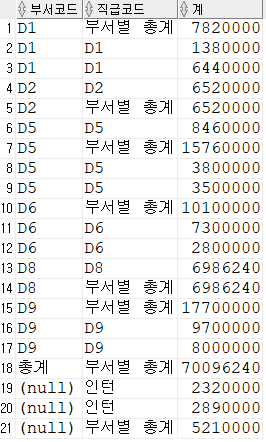
select
    decode(
    	grouping(dept_code),
        0,
        nvl(dept_code,'인턴'),
        1,
        '총계'
        ) "부서코드",
    decode(
    	grouping(job_code),
        0,
        nvl(job_code,'인턴'),
        1,
        case
        	when grouping(dept_code) = 1
            then '총계'
            else '부서별 총계'
        end
        ) "직급코드",
    ltrim(to_char(sum(salary),'L999,999,999'),' ') "계"
from employee
    group by rollup(dept_code,job_code)
order by 1,2; 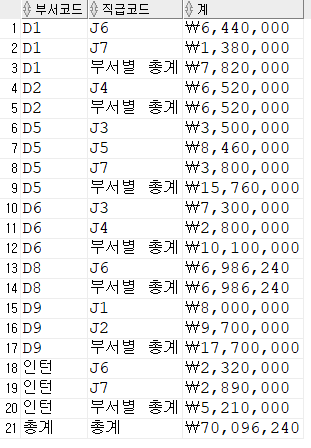
cube
rollup 함수의 업그레이드
-- cube

select
    dept_code,
    job_code,
    sum(salary)
from employee
    group by cube(dept_code, job_code)
    order by 1,2;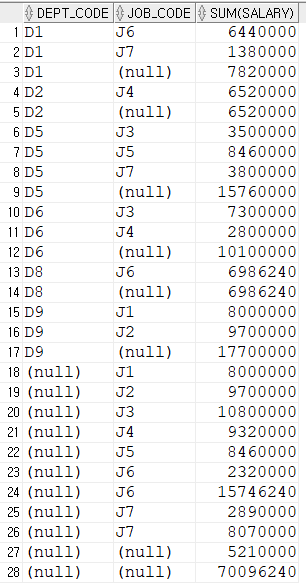
select
    decode(
    	grouping(dept_code),
        0,
        nvl(dept_code,'인턴'),
        1,
        case
        	when grouping(job_code) = 1
            then '총계'
            else '직급별 합계'
        end
        ) "부서코드",
    decode(
    	grouping(job_code),
        0,
        nvl(job_code,'인턴'),
        1,
        case
        	when grouping(dept_code) = 1
            then '총계'
            else '부서별 합계'
        end
        ) "직급코드",
   ltrim(to_char(sum(salary),'L999,999,999'),' ') "급여"
from employee
    group by cube(dept_code, job_code)
    order by 1,2;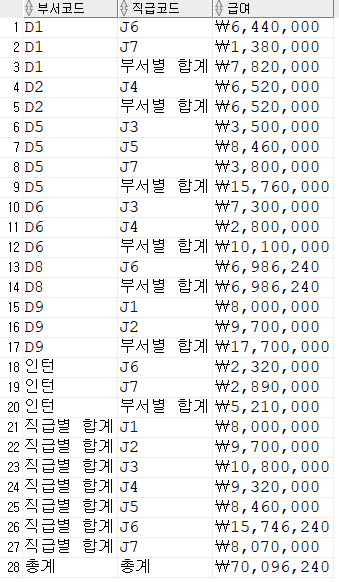
select문 동작 순서
- from ~에서
- where ~한 조건을 가진 것들을
- group by
- having
- select
- order by 정렬값은 항상 마지막
- 상황에 따른 예외 있음
-- select문 동작 순서

-- from ~에서
-- where ~한 조건을 가진 것들을
-- group by
-- having
-- select
-- order by 정렬값은 항상 마지막

select
    nvl(dept_code, '인턴') "부서코드",
    floor(avg(salary)) "급여평균"
from employee
    group by nvl(dept_code, '인턴')
    order by 급여평균;
JOIN 문
한 테이블에 여러 테이블을 참여시켜서 동작시키는 문법
Cartesian product (카티션곱)
cross join 교차 조인
--내장테이블 딕셔너리
select table_name from user_tables;

select * from DEPARTMENT;
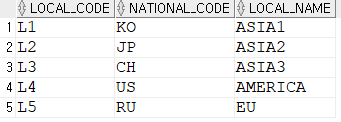
select * from LOCATION;
select * from NATIONAL;


select * from DEPARTMENT, location;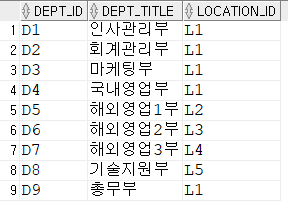
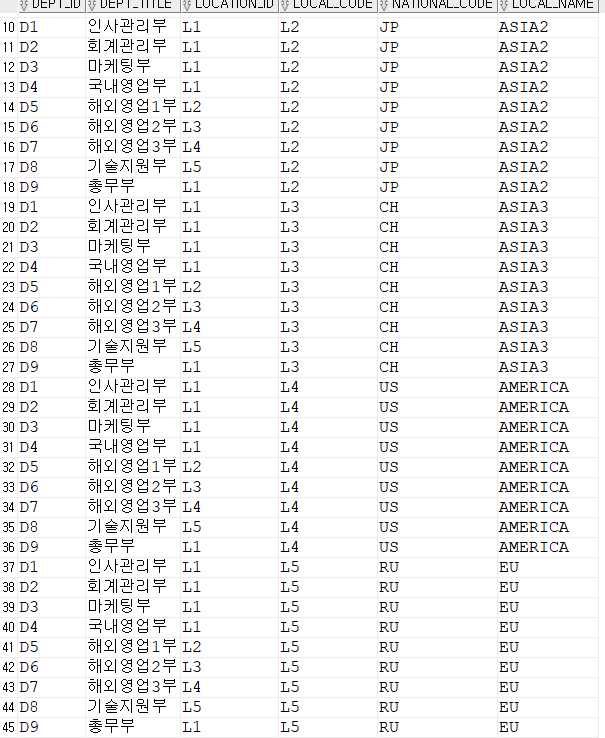
inner join
where절에 있는 조건을 충족시키는 조인
select * from DEPARTMENT, location
where location_id = local_code;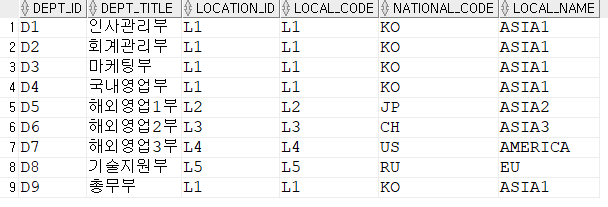
select dept_id, dept_title, national_code from DEPARTMENT, location
where location_id = local_code;

--inner join : where절에 있는 조건을 충족시키는 조인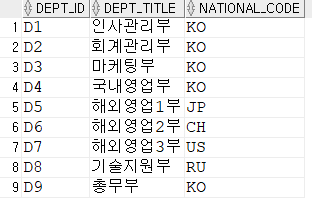
select
    emp_name,
    dept_title
from employee, DEPARTMENT
where dept_code = dept_id;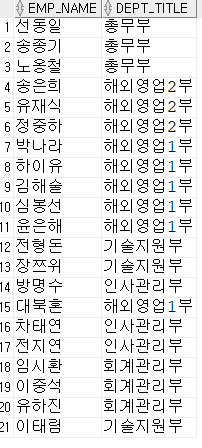
Outer join
조건이 일치하지 않지만 그래도 출력해야 되는 경우
Left Outer join , Right Outer join
select
    emp_name,
    dept_title
from employee, DEPARTMENT
where dept_code = dept_id(+);

-- outer join : dept_code쪽은 조건을 충족시키지 않아도 일단 출력
-- 오른쪽에 내용이 없어도 null로 채워달라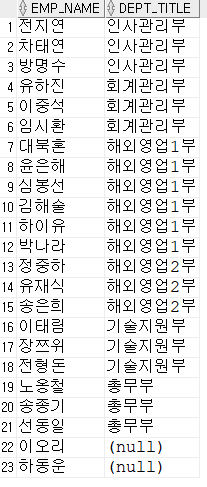
select
    emp_name,
    dept_title
from employee, DEPARTMENT
where dept_code(+) = dept_id;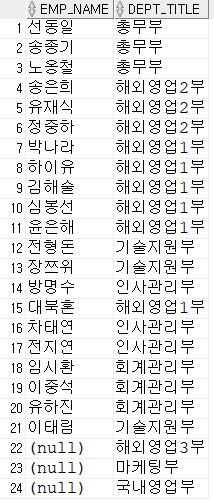
ANSI 표준 SQL문
DBMS를 가리지 않는 문법, 직관성은 떨어지나 어디에나 붙여넣어도 동작
ANSI 표준에서는 조인을 명시해야 함
우리가 쓴 문법은 오라클 전용 문법, mysql에서는 쓰지 않음
left, right join이라는 용어는 ANSI표준에서 나온말
-- 오라클 natural join
select * from employee, department;

-- ANSI natural join
select * from
    employee natural join department;
--오라클 inner join
select
dept_id,
dept_title,
national_code
from DEPARTMENT, location
where location_id = local_code;
-- ANSI inner join
select
dept_id,
dept_title,
national_code
from DEPARTMENT inner join location
on (location_id = local_code);
-- inner는 생략해도 디폴트
select
dept_id,
dept_title,
national_code
from DEPARTMENT join location
on (location_id = local_code);;-- 오라클 inner join
select
emp_name,
dept_title
from employee, DEPARTMENT
where dept_code = dept_id;
-- ANSI inner join
select
emp_name,
dept_title
from employee join DEPARTMENT
on (dept_code = dept_id);-- 오라클 outer join
select
emp_name,
dept_title
from employee, DEPARTMENT
where dept_code(+) = dept_id;
-- ANSI 표준 left outer join
select
emp_name,
dept_title
from employee left outer join DEPARTMENT
on (dept_code = dept_id);
select
emp_name,
dept_title
from employee left join DEPARTMENT
on (dept_code = dept_id);
-- left를 쓸때는 outer 생략 가능-- 오라클 outer join
select
emp_name,
dept_title
from employee, DEPARTMENT
where dept_code = dept_id(+);
-- ANSI 표준 right outer join
select
emp_name,
dept_title
from employee right outer join DEPARTMENT
on (dept_code = dept_id);Full outer join
오라클에서는 지원하지 않는 문법
--ANSI 표준 full outer join

select
    emp_name,
    dept_title
from employee full outer join DEPARTMENT
on (dept_code = dept_id);